How to Create a Simple Chat App with Microsoft Agent Framework
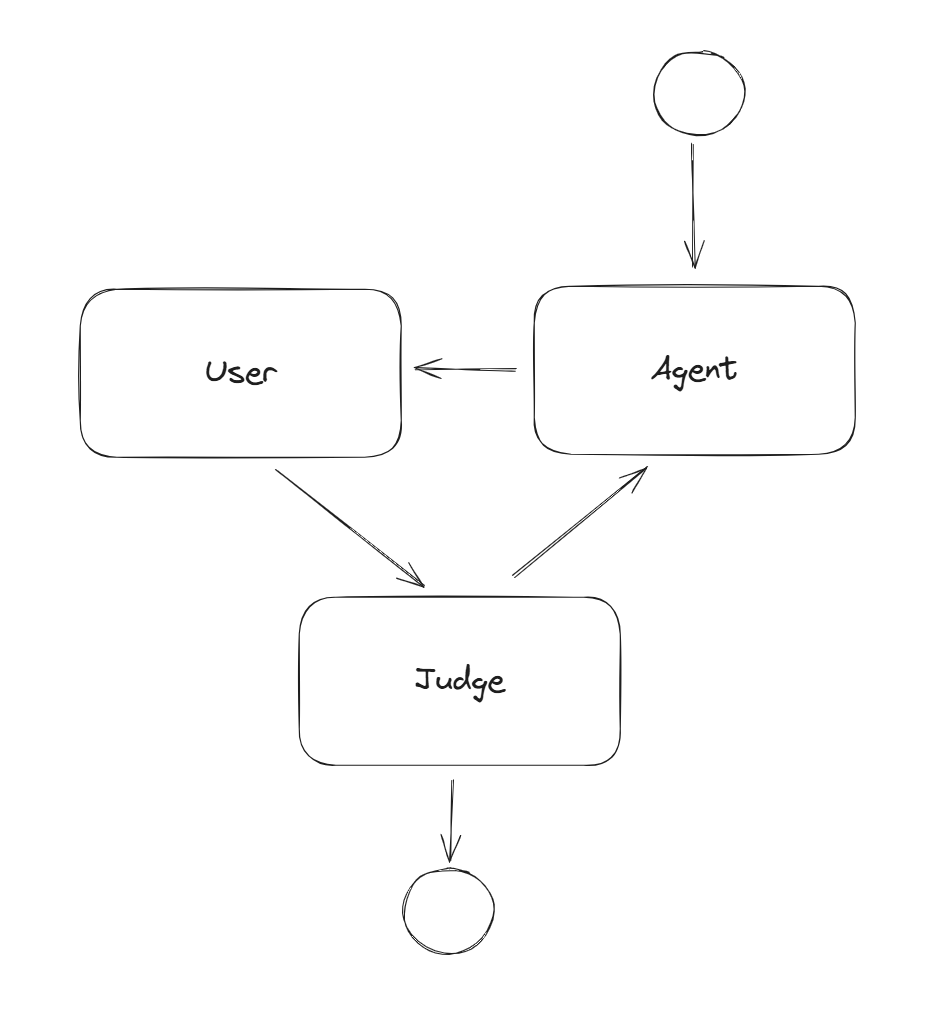
I’ve recently started exploring the new Microsoft Agent Framework, and workflow approach like it is in LangGraph looks great. To get a hands-on feel for the framework, I decided to start with a simple project: a console-based chat application.
This article documents my steps in creating this simple chat app. It’s a great way to understand the core concepts of the framework, like setting up agents, defining workflows, and handling user input in a loop.
Initial setup
- Create a new console application using the .NET CLI:
dotnet new console -n SimpleChatApp
cd SimpleChatApp
- Add the necessary NuGet packages. The core of our application will use the
Microsoft.Agentframework, and for this demo, I’m usingOllamaSharpto connect to a local LLM (https://ollama.com/).
You can add these packages via the CLI:
dotnet add package Microsoft.Agents.AI --prerelease
dotnet add package Microsoft.Agents.AI.Abstractions --prerelease
dotnet add package Microsoft.Agents.AI.Workflows --prerelease
dotnet add package OllamaSharp
- Csproj file:
<Project Sdk="Microsoft.NET.Sdk">

  <PropertyGroup>
    <OutputType>Exe</OutputType>
    <TargetFramework>net9.0</TargetFramework>
    <ImplicitUsings>enable</ImplicitUsings>
    <Nullable>enable</Nullable>
  </PropertyGroup>

  <ItemGroup>
    <PackageReference Include="Microsoft.Agents.AI" Version="1.0.0-preview.251028.1" />
    <PackageReference Include="Microsoft.Agents.AI.Abstractions" Version="1.0.0-preview.251028.1" />
    <PackageReference Include="Microsoft.Agents.AI.Workflows" Version="1.0.0-preview.251028.1" />
    <PackageReference Include="OllamaSharp" Version="5.4.8" />
  </ItemGroup>

</Project>
Code
- Initialize the
OllamaApiClientandChatClientAgentto connect and use local LLM (in this case,gemma3:4b).
var uri = new Uri("http://localhost:11434");
using IChatClient chatClient = new OllamaApiClient(uri, "gemma3:4b");
- Define a
Workflowthat orchestrates the interaction between the user and the agent. This workflow is a simple loop.
var workflow = new WorkflowBuilder(conversationAgent)
    .AddEdge(conversationAgent, inputPort)
    .AddEdge(inputPort, judgeExecutor)
    .AddEdge(judgeExecutor, conversationAgent)
    .WithOutputFrom(judgeExecutor)
    .Build();
- Add a
JudgeExecutorwhich is a custom component to decide if the conversation should continue or end based on user input. A key part of this component is sending aTurnTokento pass control back to the agent after the user provides an answer.
internal sealed class JudgeExecutor() : Executor<JudgeInput>("JudgeExecutor")
{
    public override async ValueTask HandleAsync(JudgeInput input, IWorkflowContext context, CancellationToken cancellationToken = default)
    {
        if (string.IsNullOrWhiteSpace(input.Message))
        {
            await context.YieldOutputAsync($"Done!", cancellationToken);
        }
        else
        {
            List<ChatMessage> updatedMessages = [..input.Messages, new ChatMessage(ChatRole.User, input.Message)];
            await context.SendMessageAsync(updatedMessages, cancellationToken: cancellationToken);
            await context.SendMessageAsync(new TurnToken(emitEvents: true), cancellationToken: cancellationToken);
        }
    }
}
- The main loop streams events, prints messages, and waits for the user to type a response. The code for
AgentRunUpdateEventis commented out, but you can uncomment it to see all the intermediate updates from the agent as it processes.
await foreach (WorkflowEvent evt in handle.WatchStreamAsync())
{
    switch (evt)
    {
        case RequestInfoEvent requestInputEvt:
            var data = requestInputEvt.Request.DataAs<List<ChatMessage>>() ?? [];
            foreach (var chatMessage in data)
            {
                Console.WriteLine($"{chatMessage.Role}: {chatMessage.Text}");
            }
            // Handle human input request from the workflow
            await handle.SendResponseAsync(requestInputEvt.Request.CreateResponse(new JudgeInput(Console.ReadLine(), data)));
            break;

        case WorkflowOutputEvent outputEvt:
            // The workflow has yielded output
            Console.WriteLine($"Workflow completed with result: {outputEvt.Data}");
            return;

        // case AgentRunUpdateEvent agentRunUpdate:
        //     Console.WriteLine($"{agentRunUpdate.ExecutorId}: {agentRunUpdate.Data}");
        //     break;
    }
}
- Full code:
using Microsoft.Agents.AI;
using Microsoft.Agents.AI.Workflows;
using Microsoft.Extensions.AI;
using OllamaSharp;

var uri = new Uri("http://localhost:11434");
using IChatClient chatClient = new OllamaApiClient(uri, "gemma3:4b");
AIAgent conversationAgent = new ChatClientAgent(chatClient, new ChatClientAgentOptions(instructions: "You are a conversation agent."));

RequestPort inputPort = RequestPort.Create<List<ChatMessage>, JudgeInput>("UserInput");

var judgeExecutor = new JudgeExecutor();

// Build the workflow by connecting executors in a loop
var workflow = new WorkflowBuilder(conversationAgent)
    .AddEdge(conversationAgent, inputPort)
    .AddEdge(inputPort, judgeExecutor)
    .AddEdge(judgeExecutor, conversationAgent)
    .WithOutputFrom(judgeExecutor)
    .Build();

// Execute the workflow
await using StreamingRun handle = await InProcessExecution.StreamAsync(workflow, new ChatMessage(ChatRole.User, "Hello, how are you?"));
await handle.TrySendMessageAsync(new TurnToken(emitEvents: true));
await foreach (WorkflowEvent evt in handle.WatchStreamAsync())
{
    switch (evt)
    {
        case RequestInfoEvent requestInputEvt:
            var data = requestInputEvt.Request.DataAs<List<ChatMessage>>() ?? [];
            foreach (var chatMessage in data)
            {
                Console.WriteLine($"{chatMessage.Role}: {chatMessage.Text}");
            }
            // Handle human input request from the workflow
            await handle.SendResponseAsync(requestInputEvt.Request.CreateResponse(new JudgeInput(Console.ReadLine(), data)));
            break;

        case WorkflowOutputEvent outputEvt:
            // The workflow has yielded output
            Console.WriteLine($"Workflow completed with result: {outputEvt.Data}");
            return;

        // case AgentRunUpdateEvent agentRunUpdate:
        //     Console.WriteLine($"{agentRunUpdate.ExecutorId}: {agentRunUpdate.Data}");
        //     break;
    }
}

internal sealed class JudgeExecutor() : Executor<JudgeInput>("JudgeExecutor")
{
    public override async ValueTask HandleAsync(JudgeInput input, IWorkflowContext context, CancellationToken cancellationToken = default)
    {
        if (string.IsNullOrWhiteSpace(input.Message))
        {
            await context.YieldOutputAsync($"Done!", cancellationToken);
        }
        else
        {
            List<ChatMessage> updatedMessages = [..input.Messages, new ChatMessage(ChatRole.User, input.Message)];
            await context.SendMessageAsync(updatedMessages, cancellationToken: cancellationToken);
            await context.SendMessageAsync(new TurnToken(emitEvents: true), cancellationToken: cancellationToken);
        }
    }
}

record JudgeInput(string? Message, List<ChatMessage> Messages);